
Choosing between Blogger and WordPress can be tough for hobbyist bloggers looking to pitch sponsors. Both are popular platforms, but deciding which one works best can be confusing, especially with the differences between WordPress.com and self-hosted WordPress.org.
While Blogger seems like an easy, no-cost option, it comes with limitations that could hinder long-term growth. Google has retired creator tools before, which leaves some bloggers worrying about the platform’s future. WordPress, on the other hand, offers far more customization and growth potential, but requires more upfront investment and maintenance.
We’re going to break down the differences between Blogger and WordPress, explain why WordPress is the better choice for long-term growth, and show you how it can help you turn your blog into a profitable venture!
Blogger vs. WordPress
Blogger keeps things simple with free hosting and almost no upkeep, while WordPress.org needs more setup and ongoing care but offers greater flexibility. Neither is necessarily better in isolation – the right fit depends on how much control you want, how much you’re willing to spend, and how far you plan to take your blog.
Not got time to read? Head down to our TL;DR table for a quick comparison.
Costs and budgets
If you’re looking for a free platform, Blogger seems appealing. It’s completely free, with hosting, SSL, and a subdomain included. WordPress does cost money, but the jump isn’t huge. Shared hosting starts under $10 a month, about the cost of one streaming subscription.
As your site grows, you might add extras like a $5–$15/month backup or security plugin, and a premium recipe plugin such as WP Recipe Maker, starting around $49 a year for premium features. These costs aren’t hidden; they’re essential upgrades that help protect your site and unlock new revenue opportunities.
Budget tiers are flexible. Shared plans typically range from $5–$20/month, while managed WordPress hosting designed for high-traffic blogs can cost between $30–$60/month. You can easily upgrade with a one-click process, allowing you to scale as your growth justifies the cost.
That investment brings real returns. Faster servers and built-in caching lead to stronger SEO and better performance, which means more people will find your site, trust your content, and convert. With higher ad revenue and a smoother experience for sponsors, the value is clear. Unlike a free Google subdomain, paid hosting gives you full ownership of your files, design, and monetization – without the risk of sudden shutdowns like FeedBurner or Google+.
It’s worth noting that WordPress.com and WordPress.org are not the same. WordPress.com is a hosted all-in-one platform, similar to Blogger, where you miss out on the customizability that makes WordPress so appealing. The free WordPress.com tier blocks custom plugins, limiting your flexibility. Self-hosted WordPress.org on a managed host is what truly unlocks the features and control that food bloggers need to scale and customize their sites.
Ownership, stability, and legal
On Blogger, your posts live on Google’s servers. You can export a copy, but the platform itself remains under Google’s control. If the service changes (or disappears!) your blog is at their mercy.
WordPress.org works differently. Every file and database is yours to download, move, or back up whenever you want. Since WordPress is open-source under the GPL license, you retain full rights to everything you publish. This ownership provides long-term stability and peace of mind.
Performance, flexibility, and security
WordPress has an enormous plugin ecosystem, with over 58,000 tools to extend your site, while Blogger relies on a small library of gadgets. That difference defines how much you can customize each platform.
Moving a WordPress site is usually just copying files and the database. Blogger’s export only covers posts and comments, so design tweaks and images often need manual fixes.
Security is automatic on Blogger; Google handles the updates behind the scenes. WordPress puts you in charge – you’ll run updates and typically add a backup or security plugin to match that same peace of mind.
Storage is another distinction. Blogger uses your Google account’s space, which is generous but capped. WordPress storage depends on your host: small plans suit most blogs, but if you run a huge photo library, you may need cloud storage or an upgraded tier.
How WordPress helps you grow
With the right investment, WordPress can scale to handle high traffic and grow alongside your blog. Its vast library of plugins and customization options allows you to build an experience tailored to your audience’s exact needs, helping you expand your reach and create new revenue opportunities. Blogger keeps things simple, but WordPress gives you the tools to grow and evolve as your blog becomes a business.
Monetization and professional features
On Blogger, monetization begins and ends with AdSense. WordPress opens the door much wider. WooCommerce – already powering nearly 9% of all websites – lets you sell anything from cookbooks to cooking classes. Affiliate links and sponsorship plugins make it easy to track and promote products. Membership plugins like MemberPress or Paid Memberships Pro even allow you to charge for premium meal plans or recipe bundles.
Design is another big step up. With block-based builders and thousands of ready-made Gutenberg patterns, you can create sponsor-ready landing pages or polished recipe archives that Blogger’s limited templates simply can’t match.
Audience growth and SEO
WordPress bakes in SEO advantages that Blogger doesn’t. You can switch to “post name” permalinks for clean, keyword-friendly URLs. Each post lets you set custom titles, slugs, and excerpts that map directly to search engine tags.
Since version 5.5, every WordPress install automatically generates an XML sitemap at /wp-sitemap.xml, so Google can crawl fresh recipes within minutes of publishing. Images and embeds load faster thanks to built-in lazy-loading, which helps keep visitors from bouncing (53% of people leave if a page takes over three seconds to load).
The block editor also outputs semantic HTML5 markup – clear tags like <article> and <figure> – which search engines parse more easily than Blogger’s older table-style code. And if you’re on managed hosting, server-side caching and CDN delivery often come included, giving you speed gains without extra setup.
Usability, support, and integrations
If you’re just starting out on WordPress, there is a bit to learn, but it’s manageable. Most new users publish their first post in week one, test plugins within the first month, and often try a small theme tweak by month three, all without coding experience.
The editor in WordPress is more flexible: Gutenberg’s block system lets you drag and drop layouts to create a custom design. Blogger also allows for threaded comments but still relies on a more basic WYSIWYG editor. WordPress, on the other hand, offers deeper customization options and the ability to integrate advanced commenting systems like Disqus.
Support is everywhere: forums, YouTube tutorials, and a wealth of community-driven resources make it easy to troubleshoot almost anything with a quick search. Along with this, WordPress has a vast ecosystem of plugins and a REST API that allows integration with almost any tool – CRM platforms, email providers, automation tools – far beyond Blogger’s limited set of Google-only gadgets.
TL;DR comparison of WordPress vs. Blogger
| Feature | Blogger | WordPress (Self-hosted) |
| Cost | Free, with optional domain purchase (~$10/year). | Hosting from $3–$10/month; Premium plans $30–$60/month. |
| Hosting | Provided by Google (no control). | Self-hosted, you control the server and platform. |
| Custom domain | Available with a custom domain purchase. | Custom domain included with hosting. |
| Monetization | Limited to Google AdSense. | WooCommerce, affiliate links, sponsorships, paid memberships. |
| Plugin ecosystem | Limited, no plugins. | Over 58,000 plugins to extend functionality. |
| Flexibility | Rigid templates, limited customization. | Full control over themes, plugins, and design. |
| SEO | Basic SEO, no structured data. | Advanced SEO features, automatic JSON-LD schema, and custom meta tags, available through plugins like Yoast SEO or WP Recipe Maker. |
| Design and customization | Basic themes, some limited customization. | Unlimited themes, block editors (Gutenberg), drag-and-drop builders. |
| Traffic and growth | Limited tools to scale. | Built-in tools and plugins for traffic growth (e.g., Yoast SEO, WP Recipe Maker). |
| Security and updates | Google handles security and updates. | You manage updates, with plugins for security and backups. |
| Control and ownership | Content stored on Google’s servers; limited control. | Full ownership of content, files, and site management. |
| Backup and export | Can export posts, not images or designs. | Full site backups, including images and databases. |
| Support | Limited, community-based support. | Extensive community, documentation, and professional support. |
| Migration | Difficult, requires manual fixes for images, design. | Easy migration with plugins and 301 redirects. |
| Speed and performance | Fast, but limited scalability. | Highly customizable performance with plugins and caching options. |
Signs you’re ready to upgrade
If you’re looking to sell a cookbook, course, or meal plan, Blogger’s limited e-Commerce capabilities will quickly become a hassle. WooCommerce on WordPress offers a complete checkout system and product management tools, something Blogger can’t handle without external workarounds.
As you grow and consider premium ad networks like Mediavine, you’ll find they require specific script placements to optimize ad performance. WordPress makes these integrations easy, while Blogger’s rigid templates often create friction and slow down the process.
When it comes to brand perception, sponsors and PR firms usually expect a custom domain and a polished media kit. A .blogspot.com address just doesn’t carry the same professional weight, making it harder to land bigger deals.
If you’re focused on growing your email list, Blogger’s limited integrations can hold you back. With WordPress, you can easily connect to full-funnel CRMs like ConvertKit or MailerLite, helping you manage and expand your subscriber base.
If your blog features a lot of images, you may notice Blogger struggling with slow load times, which can hurt your site’s performance. WordPress, on the other hand, lets you use caching and CDN plugins that help keep your site fast and protect Core Web Vitals, ensuring a better user experience.
Migrating without drama
Migrating from Blogger to WordPress isn’t something you’ll want to rush. While there are tools available to help you directly import posts and comments, the process often involves manually recreating some elements like design and images. Bloggers typically find that tasks such as setting up redirects, fine-tuning the design, and re-uploading images take at least a couple of weeks. It’s important to give yourself time to iron out all the details and ensure a smooth transition.
Start with the 301 redirect: add this to your .htaccess file to handle classic Blogger permalinks:
RedirectMatch 301 ^/([0-9]{4}/[0-9]{2}/.*)$ https://example.com/$1This will redirect visitors from old Blogger URLs to the corresponding WordPress pages. Don’t forget to add a rule for Blogger’s ?m=1 mobile URLs to make sure mobile visitors land on the right WordPress page.
Once your redirects are set, export your Blogger XML and use WordPress’s built-in importer to bring over your posts and comments. After that, you’ll want to re-upload or relink your images to avoid issues once your old Blogger site is private.
After launching the new site, it’s time for a crawl to check for any missing images, duplicate slugs, or leftover mobile URL issues. Keeping a complete backup of your host is essential so you can roll back quickly if something goes wrong.
Before flipping the DNS, test everything on a staging sub-domain to catch any last-minute problems. For high-traffic sites, it’s often worth hiring a migration specialist to ensure a smooth transition and avoid revenue dips during the process.
Why food bloggers choose WP Recipe Maker (WordPress-only)
⚠️ WP Recipe Maker is a WordPress-only plugin and is not available for Blogger or other similar all-in-one platforms – migrating to WordPress is necessary to unlock these features.
WP Recipe Maker automatically outputs JSON-LD recipe metadata, the format Google recommends for rich results. This simple integration boosts your SEO and visibility without extra effort.
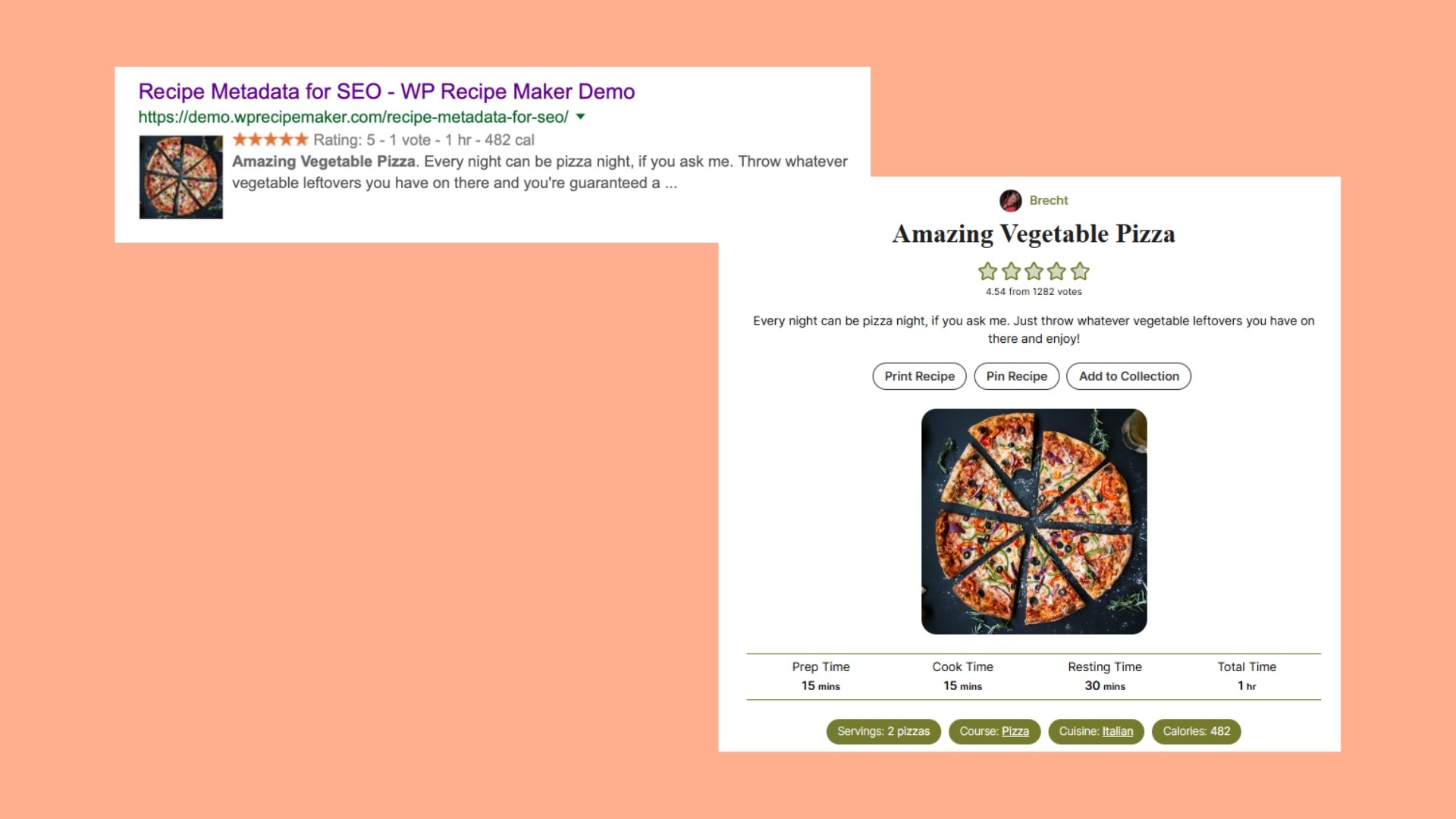
For those on premium tiers, features like adjustable servings and a built-in nutrition label add interactive touches that increase reader engagement and provide signals that Google rewards, keeping visitors on your page longer. Version 9.6 introduced a QR-code block for print pages, and Instacart/Walmart links were already supported, making it easier for readers to shop ingredients directly from your posts.

The plugin also includes over 20 importers, making migration from other platforms quick and painless. One case study from FitTasteTic shows a ~500% traffic boost after switching to WP Recipe Maker’s schema.
WP Recipe Maker’s ad-friendly markup separates content from layout, allowing ad networks like Mediavine to easily inject high-viewability ad slots without breaking your design. The premium tiers offer built-in monetization options, including auto-nofollow affiliate links and integrations with Instacart and Walmart, making your recipes shoppable.
Choose the platform that fuels your blog’s growth
Sure, Blogger remains a great, free option for hobby bloggers or casual food creators who don’t want to worry about maintenance. However, if you’re serious about scaling your blog and monetizing your content, WordPress is free to use but does require a small monthly investment for hosting and maintenance. This investment gives you greater control and long-term stability.
WordPress’s plugin ecosystem, with tens of thousands of add-ons, lets you transform a simple blog into a powerful site with multiple revenue streams. With careful planning and 301 redirects, a WordPress migration can preserve your SEO traffic through the transition.
For food bloggers, WP Recipe Maker unlocks advanced recipe features that help you engage readers and boost traffic, all while maximizing monetization opportunities. Get the plugin today!