

Starting a food blog can be exciting, but many best host lists out there come with flashy affiliate links that promise unlimited everything for next to nothing. The truth is, shared hosting plans (even at bargain prices) often struggle when it comes to the demands of recipe card databases and high-traffic spikes.
We’ll take a closer look at what food blogs really need in a host, breaking down the technical features you should look for at each budget level. This way, you won’t overpay for features you don’t need or face sudden migrations due to overlooked technical issues!
Why recipe workloads need special hosting for food blogs
Food blogs are database applications. They generate 200+ queries per recipe page. Entry-level plans cost $3-7 monthly and can struggle under traffic spikes and heavier plugin/ad stacks. Recipe plugins create Ajax calls for ratings. High-resolution images require additional server resources. Serious food bloggers need more – VPS or managed hosting tiers with additional CPU, RAM, and IOPS become super important.
Each recipe card triggers multiple Ajax calls, JSON-LD blocks, and can include multi-MB images, pushing CPU and RAM far beyond the capacity of standard websites. Hosting with low-latency object caching (Redis/Memcached) and an HTTP/3 CDN is vital to reduce Time to First Byte (TTFB) and improve Core Web Vitals.
Your host must be able to whitelist necessary REST paths to prevent things like ratings and recipe collections from breaking.
SSD/NVMe storage and at least 512MB PHP memory help avoid silent I/O bottlenecks, especially on publishing days.
Automatic backups and staging environments that don’t burn through plugin licenses are essential when tweaking templates or troubleshooting schema issues – these features can be lifesavers when things go wrong.
Which hosting is best for WordPress food blogs?
Launch / small sites (< 100 recipes, < 10k sessions)
For brand-new food blogs, affordable plans like BigScoots Starter ($34.95/month) with LiteSpeed Cache are an excellent choice. They’re powerful enough to handle recipe plugins, large images, and ad scripts while keeping page loads under three seconds. At this stage, your main goal is to build content and test your workflow – no need to pay extra for features you won’t use yet.

Example: A new baking blog with 50 recipes and 5,000 monthly visitors maintained fast load times on a Starter plan, even while uploading multi-MB photos.
You’ll know it’s time to upgrade your hosting when your site starts loading slowly.
Growing blogs (10k–50k sessions)
As your traffic grows, you might need more memory and CPU power to handle recipe queries and higher image volumes. BigScoots Managed WordPress Starter ($35/month) or similar mid-range plans from hosts like SiteGround offer stronger caching, more bandwidth, and faster Time to First Byte (TTFB). These plans suit bloggers starting to earn from ads or affiliate links who want consistent site performance.
Example: A home chef blog that crossed 25,000 monthly sessions found that their old starter plan was timing out during peak traffic. Upgrading to a managed plan stabilized the site, and recipes continued to load instantly for readers.
At this stage, you’re looking for something reliable that gives users a good experience, especially if you’re making money from ads or links.
Established traffic (50k–100k sessions)
Once you’re managing 50,000-100,000 monthly visitors, you’ll benefit from higher-performance setups such as VPS hosting (e.g., BigScoots VPS LiteSpeed) or cloud-based tiers like Cloudways Medium. These provide dedicated resources, Redis caching, and image CDN support – great for media-heavy or ad-driven sites.
Example: A food review blog hitting 75,000 monthly visitors upgraded to a 4 GB VPS plan and noticed faster recipe page rendering, even during ad refreshes. Readers could browse multiple recipes without waiting for content to load, which boosted engagement and session duration.
Good hosting means more money, as slow sites lose ad views and sales.
High-traffic monetized sites (> 100k sessions)
For blogs with heavy traffic or video content, BigScoots Managed Cloud or premium managed hosting like Kinsta Business can automatically allocate more resources when needed. This helps prevent slowdowns during viral spikes while keeping your setup stable and low-maintenance.
Example: A recipe blog with 150,000 visitors consistently loaded high-resolution videos and hundreds of recipes in under two seconds, even during peak traffic periods, all without server interventions.
Good hosting offers performance and the confidence that your website can grow, make money, and handle technical needs without issues.
Budget clouds vs. expensive shared plans
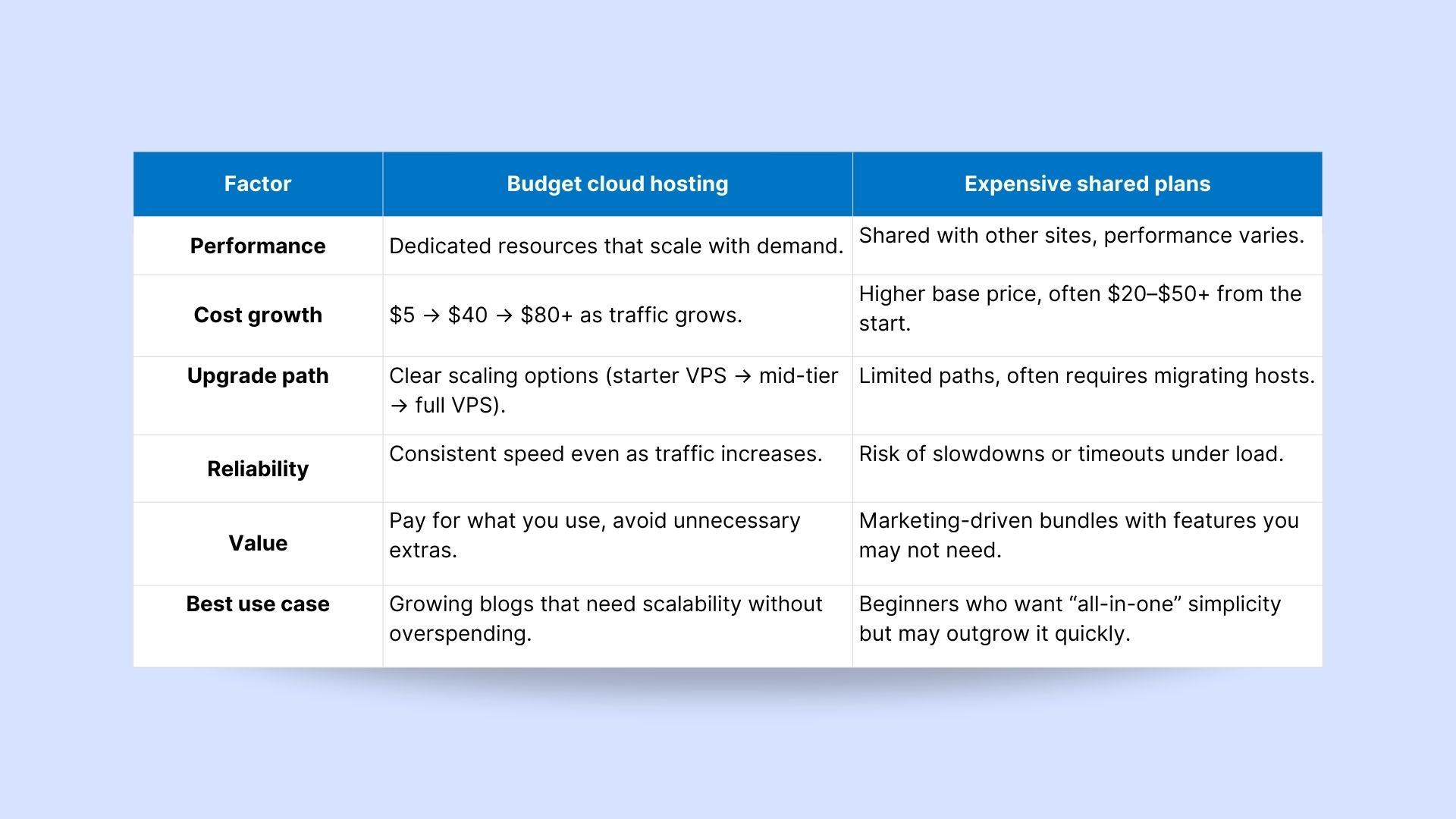
Well-chosen budget clouds often outperform pricier shared hosting. The trick is picking a host that lets you stay on one platform while expanding – BigScoots, for instance, supports everything from shared to managed cloud within the same environment.
Expect costs to vary roughly between $5 → $40 → $80+ per month, depending on your workload. Match your plan to your site’s performance, not the marketing claims. If your site slows down or query errors appear, that’s your cue to upgrade – not to migrate.
Example: A growing food blog started on a $7 starter VPS, then upgraded to a mid-tier plan at 30,000 monthly sessions, and finally moved to a VPS at 80,000 sessions. Following these stages, the site stayed fast and stable without overspending on unnecessary features.
Setting up a recipe blog without overusing hosting resources
WP Recipe Maker runs efficiently across all hosting environments, but it works best on optimized platforms that offer features like Redis caching, CDN support, and generous memory limits.
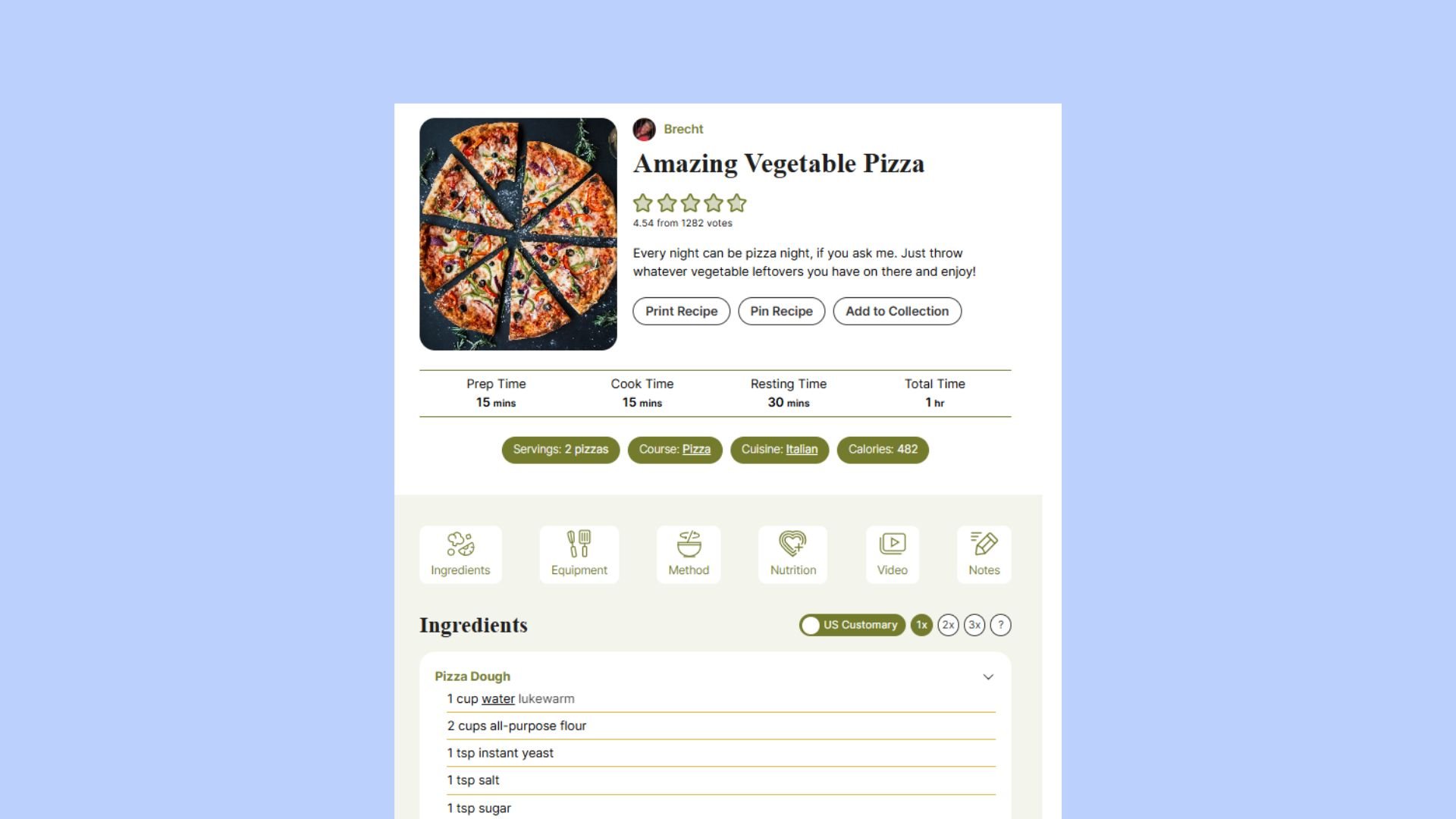
The Meadow template on WP Recipe Maker 10.0.0, for example, is lighter than many alternatives, and if your hosting keeps Time to First Byte (TTFB) under 1 second, your content will load before ads even appear. This gives people a smooth experience right from the first visit.
Interactive endpoints for ratings and Recipe Collections should be excluded from full-page caching. This setup means users can rate recipes without full page reloads, keeping the site fast and responsive.
Bulk imports and advanced features like nutrition calculations can be resource-intensive. On lower-tier shared hosting plans, this may lead to timeouts or slowdowns. If you often work with large recipe collections or complex nutrition data, upgrading your PHP memory limit can help your site run more smoothly.
WP Recipe Maker works well on any host, but it performs best on platforms that support Redis, CDN integration, and generous memory limits – features that make a significant difference in speed, reliability, and user experience!
Match your hosting to your recipe workload
Your hosting should grow with your blog without slowing it down. The goal isn’t to switch providers as your traffic increases; instead, it’s to choose one that scales smoothly as you do.
Here’s what that growth typically looks like:
Start around $7/month (BigScoots Starter 512 shared hosting) → move to $35/month (BigScoots Managed WordPress Starter, 2 GB RAM) → grow into $50-80+/month (BigScoots VPS LiteSpeed) → and finally scale into autoscaling Managed Cloud tiers once you’re above 100K sessions (BigScoots Managed Cloud).
This progression keeps your site fast, reliable, and ready for growth without the stress of migrating.
With WP Recipe Maker, keep your recipes loading fast, engage readers, and boost SEO!