

Roundup posts aren’t new. For years, food bloggers have been putting together “20 Best Chili Recipes” and “Top 10 Weeknight Dinners” with varying results. However, one thing that has changed is reader expectations. They don’t want endless scrolling or a list that leaves them wondering what to cook. They want useful, thoughtful collections that make decision-making easier.
A recipe roundup is a curated collection of recipes centered around a specific theme, ingredient, holiday, or meal type. However, the most effective roundup posts today are like mini discovery engines, helping people quickly find what works for them.
This is good news for food bloggers. Smartly curated roundup posts don’t just improve engagement – they drive longer sessions, boost affiliate revenue, and earn you real SEO credit! With the right tools, such as WP Recipe Maker, you can turn basic lists into interactive content that supports your readers and scales with your blog.
Common Recipe Roundup Themes
Recipe roundups help readers find inspiration for various occasions and needs. Common themes include:
- Seasonal and holiday: Collections built around specific times of year, from summer grilling ideas to festive Christmas cookies and Thanksgiving side dishes.
- Ingredient focus: A chicken recipe roundup, strawberry desserts, or recipes using pantry staples that help readers use what they already have.
- Meal type and dietary needs: A dinner recipe roundup, gluten-free breakfasts, vegetarian lunches, or easy recipe roundups designed for busy weeknights.
- Cooking method and equipment: Instant Pot meals, air fryer favorites, sheet pan dinners, or slow cooker comfort food gathered in one place.
- Menu ideas and entertaining: Complete menu plans for parties, themed dinners, game day spreads, or holiday gatherings with complementary dishes.
Popular food blogs with recipe roundup examples
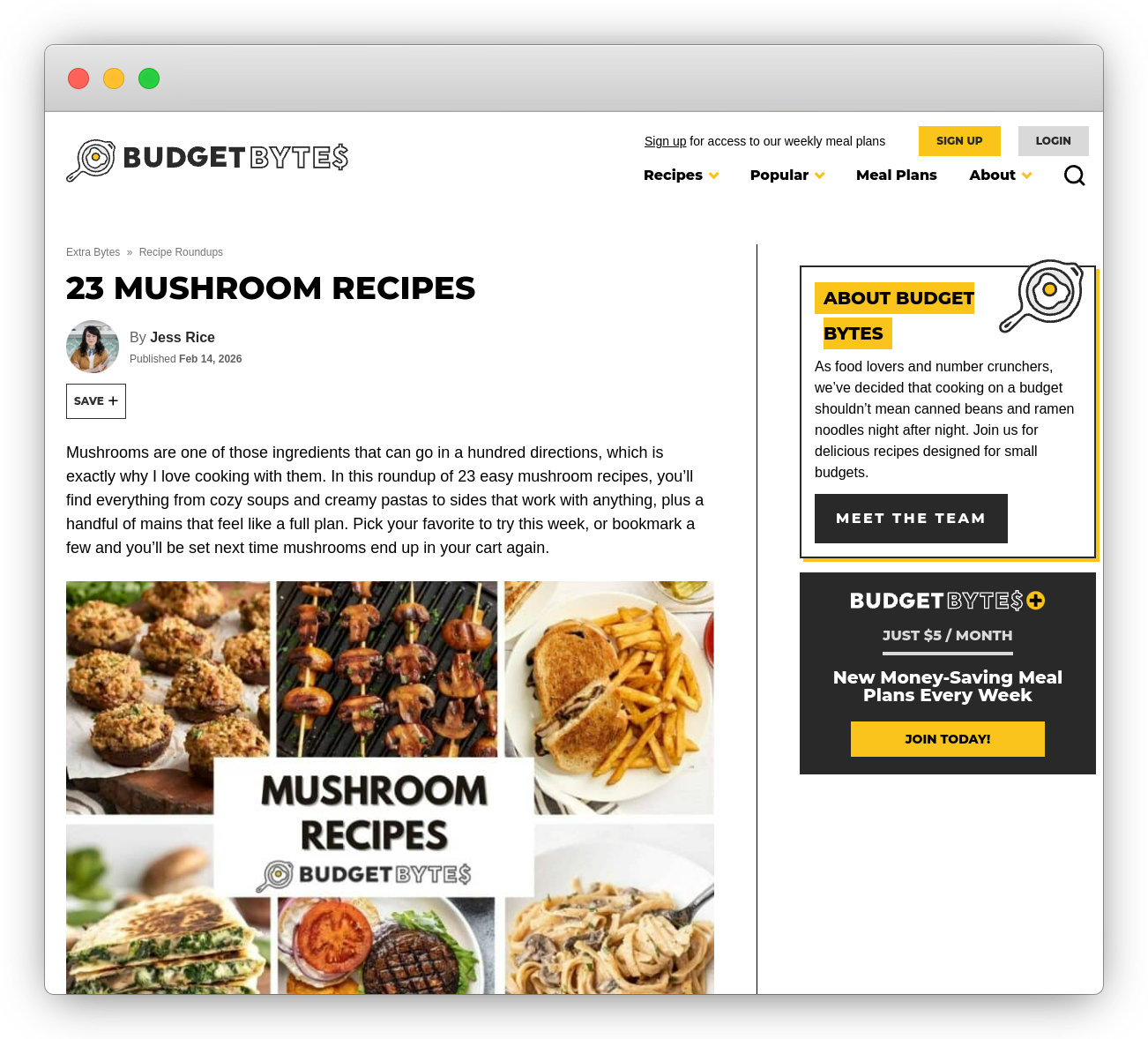
Popular food blogs regularly use recipe roundups to help readers explore ideas quickly. Sites like Budget Bytes, Love and Lemons, The Kitchn, and Epicurious organize their collections with strong visuals, clear headings, and short descriptions that explain why each recipe is worth clicking. The best examples group recipes logically, use consistent photography, and make scanning easy. You’ll also find recipe roundups on independent blogs, curated YouTube playlists, and even inside themed cookbooks, showing how flexible and powerful this format can be.
Why food bloggers create recipe roundup posts
Recipe roundup posts increase engagement by encouraging readers to explore multiple recipes in one visit, extending session time naturally.
They support monetization by driving more affiliate clicks and ad impressions as readers compare options within a single curated collection.
Well-structured roundups can rank for long-tail search terms and earn enhanced visibility through rich results and organized list formatting.
They also help bloggers reuse and reorganize existing recipes, turning published content into strategic collections that serve new search intent.
The hidden cost of traditional recipe lists
A reader clicks into your “50 Instant Pot Recipes” post, hoping to find something quick for dinner. Instead of guidance, they get a long, unfiltered scroll of options. Every recipe looks appealing, but none clearly stands out. After a few minutes of comparing titles and photos, they leave without choosing anything.
When recipe roundups lack structure, they create decision fatigue. Too many similar options without hierarchy or filtering makes it harder to choose, not easier.
Readers don’t just want volume. They want curation that respects their time, ingredients, dietary needs, and skill level, helping them quickly identify what will actually work for them.
How to create recipe roundups with WP Recipe Maker
WP Recipe Maker makes it easy to turn your existing content into curated, high-impact roundup posts. Whether you’re building a seasonal collection, a diet-specific guide, or just surfacing your best 30-minute meals, you can do it all using your already-published recipes.

For your roundup to appear in Google’s rich results carousel, it needs to include ItemList metadata – a technical requirement that WP Recipe Maker handles automatically in the background, so you don’t have to think about it.
You’ve got several options:
- Add individual roundup items directly to a post using the dedicated block. This gives you full control over where each recipe appears alongside your own text and images.
- Alternatively, you can build a Roundup List in the WP Recipe Maker dashboard to manage collections in one place, then insert the whole list into any post. This is especially useful if you plan to reuse the same roundup across multiple posts or want to keep everything organised from one central spot.
- Or you can even build a Roundup List by bulk editing through the WP Recipe Maker > Manage page, where you can order and filter recipes by tag, category, or keyword – perfect for larger collections that require easier management.
In all cases, WP Recipe Maker automatically adds the proper ItemList metadata in the background, allowing Google to feature your roundup in a rich results carousel. And if you update a recipe later – new photo, better rating, improved SEO – it’s reflected in every roundup it’s part of. No extra work needed.
This is a smarter system for discovery. Readers can actually find what they’re looking for. You spend less time manually updating posts. And thanks to affiliate links within posts, you start to see actual revenue.
7 Ways to create roundup posts readers will use
1. Constraint-based collections that solve specific problems
Generic “keto dinner” roundups are everywhere, but for readers who actually follow a keto diet, they’re often useless. Recipes might be labeled “low carb” but still sneak in 20g per serving. That’s a quick way to lose trust…and you don’t want that.
With WP Recipe Maker’s premium feature, the automatic nutrition calculation, you can build roundup collections that actually respect dietary constraints. For example, a “Keto Dinners Under 10g Net Carbs” post can pull only recipes that meet that threshold. Readers immediately know every dish fits their plan, and trust you as a source who gets it.
You can also use ingredient costs to create a “High-Protein Meal Prep on a Budget” roundup that ranks recipes by protein-per-dollar. With WP Recipe Maker, you can store custom cost fields, but note that ingredient costs must be entered manually through the Custom Recipe Fields feature (Pro). This approach is practical, scannable, and directly helps your audience make smarter choices.
And, once you’ve earned trust, it’s easy to recommend tools that support their goals – spiralizers, protein blenders, airtight meal prep containers – because your audience will trust you! Then, you can start popping in those all-important affiliate links and earn money through your posts.
This kind of targeted curation builds real loyalty and long-term relationships with real people.
2. Seasonal collections that you can easily update
If you’ve ever spent a December afternoon manually updating your “Christmas Cookies” roundup, checking links, swapping in new bakes, and fixing thumbnails, you know how tedious it can be. And by the time you’re done, it’s already time to start prepping for Valentine’s Day.
WP Recipe Maker solves this with custom taxonomies. You can tag every recipe by occasion (like “Christmas,” “Easter,” or “Fall Baking”) as you publish them. When it’s time to refresh a roundup, those tags make it simple to pull up all the relevant recipes from the manage page so you can quickly add or update them.
You can even combine tags with other filters, like only showing highly rated Christmas desserts or vegan-friendly Thanksgiving mains, to keep your roundups feeling fresh, helpful, and tailored to what your readers want each season. That’s right – no more rebuilds!
3. Time-based roundups that respect busy schedules
“Quick dinner” is a moving target – what’s fast for one reader might still be too much for someone else. One-size-fits-all roundups labeled “easy weeknight meals” often fall flat because they don’t reflect how different people cook on busy nights.
Try filtering recipes by cooking time, so you can build roundups that match real-world constraints. A “Dinners by Time” roundup might include clearly defined sections like 5-Minute No-Cook, 15-Minute One-Pan, and 30-Minute Family Meals, giving readers a shortcut to the option that fits their night.
4. Skill-level collections that build confidence
Skill mismatches can really put people off your content – they want to know it’s within their ability to be able to follow a recipe. A “Beginner Bread Baking” roundup can include only foolproof recipes with minimal ingredients. Then build a separate “Advanced Techniques” post featuring recipes that require proofing, shaping, or specialty flours.
Better yet, link them. End your beginner post with a gentle nudge: “Ready to take things up a notch? Try these next.” That kind of progression builds trust and keeps readers engaged across multiple posts.
5. Ingredient-first collections that use what’s already in the pantry
If your roundup includes ingredients like pomegranate molasses or fresh rosemary, you risk losing readers who don’t have them in their kitchen. Instead of grouping recipes by title, try organizing them by ingredients your readers already have. A roundup like “Recipes Using These 10 Pantry Staples” becomes instantly helpful.
Take it further with a “Missing just one ingredient?” section that shows recipes that only need one more item. This small nudge could turn a closed tab into a quick grocery run.
By adding the Shop with Instacart button to your recipes, you let readers shop for ingredients directly, turning your content into a great shopping experience. Once enabled in WP Recipe Maker’s integrations settings, this feature makes your recipes more useful and monetizable (available in the US only).
| ⭐ Bonus idea: offer a Pantry Meal Planning Guide as a free download in exchange for an email – an easy win for your newsletter list! |
6. Budget-based roundups with transparent cost breakdowns
“Budget-friendly” means very different things to different readers. One person’s $5 dinner is another’s splurge. Without clear pricing, even the most thoughtful budget roundups leave people guessing or doubting your credibility.
With WP Recipe Maker’s custom fields, you can display actual per-serving costs right on each recipe card. A roundup like “$3-and-Under Dinners” shows readers exactly how the math works: total cost, number of servings, and even what they can expect in leftovers.
For added trust, include a simple note like “Prices based on Walmart online, March 2024.” That extra transparency builds confidence and keeps readers coming back.
This audience is also primed for useful product recommendations, such as bulk pantry items, freezer containers, or prep-friendly tools like rice cookers!
7. Substitution-friendly collections for dietary flexibility
Even the most excited reader will bounce from a recipe if it includes something they can’t eat, and have no clue how to swap it. That’s a missed opportunity, especially when many recipes do work with substitutions… they’re just not marked clearly.
With WP Recipe Maker, you can build roundup posts that specifically highlight recipe substitutions. A roundup like “Allergy-Friendly Baking” becomes a true resource when each card includes clear notes on egg alternatives, dairy swaps, or gluten-free flour mixes, plus how the results turn out.
Substitution clarity builds trust. And trust drives action!
Turn every roundup into your highest-converting post
A well-structured roundup changes how readers interact with your blog. In fact, you could start seeing results in the first 6 months:
By Week 1, you’ll start seeing comments that reflect real appreciation: “Finally, a collection where everything genuinely takes 30 minutes!”
By Month 1, bounce rates drop as readers find recipes that match their needs faster.
By Month 2, affiliate conversions improve because the right recommendations appear at the right moment.
By Month 3, SEO starts working harder for you, with rich results and long-tail queries like “keto Instant Pot recipes under 10 carbs” bringing in steady traffic.
By Month 6, your roundups are your top-performing posts – not because they’re longer, but because they’re more useful.
And the best part about all of this is you’ll know it’s working when other food bloggers start asking how you make your roundups so organized and actionable!
So, what are you waiting for? Get started with WP Recipe Maker today!