
Two recipe plugins, two browser tabs open, and one quiet worry that you will pick the wrong one and feel it a year from now. That is where most food bloggers are when they start comparing these two.
Fortunately, WP Recipe Maker and WP Delicious are both reliable, well-built tools. Both create the recipe schema Google reads to show those rich results, the search listings with a photo and a star rating. Both work with Rank Math and Yoast, so on the SEO basics, you are covered either way.
The decision comes down to control and stage. WP Delicious leans toward preset polish and offers a one-time lifetime license, which can be plenty for a smaller or newer site. WP Recipe Maker gives you deeper design control, more room to grow, and a wider set of schema types working in the background, which counts for more as your traffic climbs. The fear of getting locked in is mostly gone too, since both plugins have enabled imports from each other since 2024.
We’re Bootstrapped Ventures, the team that builds WP Recipe Maker. Everything we say about WP Delicious below comes from its own features, docs, and pricing pages, linked so you can check it yourself. We compare pricing, design, affiliate tools, migration, and schema, then match each plugin to your stage.
WP Recipe Maker or WP Delicious?
For most food bloggers, WP Recipe Maker is the stronger choice. It gives you the design control, monetization depth, and schema breadth that keep paying off as your recipe library and traffic grow, and its Template Editor gives you full design control from day one. WP Delicious is a reasonable starting point if you’re on a small, newer site and want a polished card fast at a one-time price, but most blogs outgrow that stage, and WP Recipe Maker is built for where you’re heading.
WP Recipe Maker hands you a Template Editor for full design control and a central affiliate link library, where you set the link for an ingredient like butter once and it applies across every recipe that uses it. That kind of setup earns its keep once you have hundreds of recipes, when editing links one card at a time stops being practical. The feature depth is the point, and step-by-step WP Recipe Maker 101 guides and welcome videos walk you through every feature from your first recipe.
WP Delicious takes a lighter, preset-led path: you can build the recipe inside the post and pick from ready-made layouts. WP Recipe Maker gives you the design control and monetization depth that approach trades away, which matters more with every recipe you add.
| Key takeaway Choose WP Recipe Maker if you want design control, deeper monetization, and room to grow into bigger features later. Choose WP Delicious if you run a small, newer site and want preset layouts, a fast first recipe, and a one-time price. |
If you’re still weighing the wider field, our guide to the best WordPress recipe plugins compares the other main options.
What is free and what you pay for
WP Recipe Maker has a free version, and it runs with no time limit and no cap on how many recipes you publish. The free plugin builds working recipe cards and outputs valid schema and includes the Template Editor, so your recipes are eligible for those rich results from day one. For a brand-new blog, that is a real starting point rather than a locked demo.
The paid line is about design and money. WP Recipe Maker Premium ($49 per year) is where two things you will eventually want live.
- Ingredient and equipment affiliate links, which the free plugin leaves out entirely.
- Adjustable servings, so readers can scale a recipe up or down.
- Premium also adds in-card user ratings, Favorite Recipes, and Cook Mode for readers following along on a phone.
Automatic nutrition calculation and unit conversion sit one step higher in the Pro plan ($99 per year), which the pricing section covers in full.
WP Delicious’s free tier includes three preset layouts, reader bookmarking, user ratings, and basic serving adjustment, so a small blog can look tidy without paying. You move up to a paid plan for equipment affiliate links, more layouts, unit conversion, and automatic nutrition.
Adjustable servings are free on WP Delicious and sit in WP Recipe Maker’s Premium tier, alongside the affiliate tools most monetizing blogs are paying for anyway. Affiliate links, though, cost money on both. The free tier is a fine place to begin, but most bloggers add Premium once their recipes start earning.
For the full line-by-line split, see the WP Recipe Maker Free vs Premium comparison.
How you build a recipe in each plugin
Adding a recipe means two jobs in both plugins. First, you enter the recipe content, like ingredients, times, and instructions. Then you place that recipe on a post or page so readers can see it. Each plugin handles those two jobs in its own style.
WP Recipe Maker keeps your recipes in one central spot. You can create a recipe from the WP Recipe Maker area, or start one right inside a post using the WP Recipe Maker block. Either way, the recipe becomes its own reusable item that you drop into a post through a block, a shortcode, or an Elementor widget. The same recipe can appear in more than one post without being rebuilt, and the central manager lets you search, filter, clone, and bulk-edit as your library grows.
WP Delicious gives you two routes. You can create recipes under its own Recipes menu and embed them with the Recipe Card block, or use the Dynamic Recipe Card block, one of its nine Gutenberg recipe blocks, to fill in a whole recipe right where you are writing the post. For a single recipe built inside one post, the inline route feels quick and low-fuss.
So the real difference is habit, not difficulty.
| Key takeaway WP Recipe Maker stores each recipe centrally, then inserts it by block, shortcode, or Elementor, which rewards reuse across a big library. WP Delicious lets you build recipes under its Recipes menu or inline with the Dynamic Recipe Card block as you write. |
Design control, AI and recipe card templates
The WP Recipe Maker Template Editor is a visual tool that rebuilds your recipe card block by block. It opens from your WordPress menu and works on three card types. Those are the full recipe card, the jump-to-recipe snippet, and roundup items. This is the feature power users point to most, and it ships with the free plugin, while the paid tiers add premium templates rather than the editor itself.
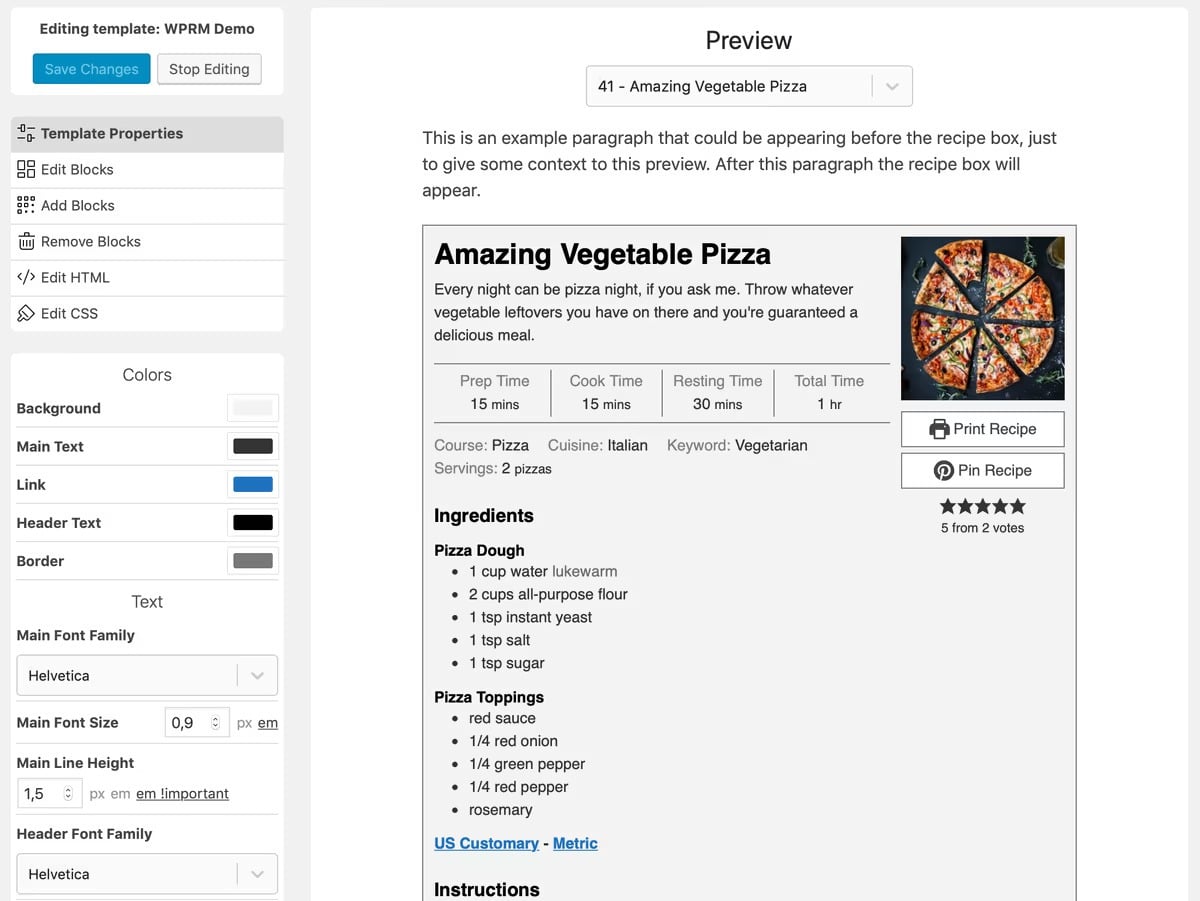
You start by cloning one of the built-in templates, since the originals stay locked so you can always reset to a clean slate. Working from that copy, you can make these changes.
- Change background colors, borders, fonts, sizes, and text colors from Template Properties.
- Add, remove, or reorder blocks like the rating row, video, or equipment list.
- Edit the raw HTML to hardcode your own text or markup.
- Adjust the CSS directly, with your property settings available as variables.
Every edit shows up in a live preview next to you, built from a real recipe on your site, so you are never guessing at the result.
WP Delicious takes the preset route. Its free tier ships three card layouts, and Pro opens up eight. You can still adjust colors, units, and a few other details on top of any layout, so a card looks polished without much fuss. What you do not get is the block-by-block rebuild or direct CSS control.
So the gap comes down to how far you want to push the look. Presets give you a finished card in minutes. The Template Editor matches your brand down to the last detail, and keeps up as that brand shifts over the years.
WP Delicious sells AI as paid add-ons, including an AI Recipe Assistant and the PixifyAI image generator. WP Recipe Maker’s AI Assistant, currently for Elite Bundle customers, takes a different line: it handles the tedious parts of publishing and, by design, won’t generate a full recipe for you, so the finished photo stays a picture of your real food.
Affiliate links and shoppable ingredients
Affiliate income on a recipe blog comes from two places. You can link ingredients and equipment to a store such as Amazon and earn a cut when readers buy the product. You can also add a shoppable button that sends a full ingredient list to an online grocery cart. Both plugins handle both jobs, and the real difference shows up once your recipe count climbs.
WP Recipe Maker manages affiliate links from one central spot, starting in Premium ($49 per year). You set the link for an ingredient such as butter a single time, and it then appears on every recipe that uses butter. Equipment links work the same way, with Amazon product images and your own affiliate code supported.
For grocery carts, WP Recipe Maker connects to three services.
- Chicory links your ingredients to 70-plus retailers, including Instacart, and pays a commission.
- Instacart also works on its own, with commission through its Tastemaker program.
- Walmart, powered by eMeals, adds a shoppable button, though it does not currently share revenue.
Chicory’s checkout only works for visitors inside the United States, so an international audience will not reach that grocery step. WP Recipe Maker can also place contextual recipe ads inside the card through Chicory, so the same card that lists ingredients can earn ad revenue.
WP Delicious offers similar monetization tools in its Pro plugin ($59), including equipment affiliate images and automatic ingredient linking, plus a Chicory integration. WP Recipe Maker covers more ground for less: Instacart, Walmart, and Chicory are all included, and ingredient/equipment affiliate links unlock at Premium, the cheaper, earlier tier. Both plugins can turn ingredients into income, but WP Recipe Maker gets you there with fewer integrations locked behind a higher price.
How each plugin handles nutrition facts
WP Recipe Maker calculates nutrition for you, starting in the Pro plan ($99 per year). It reads your ingredient list, matches each item against a nutrition database, and fills in the label on its own. You can still click any value and adjust it by hand, which helps when a number needs to be exact or an unusual ingredient gets misread. WP Recipe Maker also covers the cost of that nutrition data, so there is nothing extra to sign up for on the side.
WP Delicious handles this by tier. The free version uses manual entry, where you type the values in yourself. Pro adds an Automatic Nutrition Calculator that reads your ingredient list the same way, though you connect and manage your own nutrition API key to switch it on.
Cook mode, saving recipes and meal planning
Both plugins can keep a reader’s screen awake while they cook, and WP Recipe Maker Premium adds a guided view on top. Its Prevent Sleep toggle stops a phone or tablet screen from going dark, and you can set the toggle’s placement and label in the Template Editor so it fits the rest of your card. The Cook Mode Popup goes further: readers tap Start Cooking and follow the recipe one step at a time, with the ingredients for each step shown alongside it. WP Delicious Pro has its own Cook Mode toggle that keeps the screen awake, plus a Reading Mode in its floating recipe bar.
Saving recipes is where the two take clearly different routes. WP Recipe Maker Premium adds Favorite Recipes, so any visitor can save a recipe in one click without creating an account, and logged-in readers see their favorites on every device. The Elite plan builds that into Recipe Collections, a reader-facing meal planning hub the next part covers in full. WP Delicious ties saving to reader accounts, where registered visitors bookmark recipes into a personal dashboard on your site.
Either way, both features work toward the same goal, which is keeping people coming back to your site rather than saving your recipe somewhere else and drifting off.
Reader-driven collections vs publisher meal plans
WP Recipe Maker’s Recipe Collections put the reader in charge. Visitors save recipes into their own sets and get a combined shopping list built from everything they picked. For guests, those collections save in the browser, and logged-in readers sync them across devices. You can also seed a few starter collections to get people going, with the Elite plan.
WP Delicious offers its Meal Planner as a separate paid add-on. Here you build the weekly plans yourself, sorting recipes into days and courses such as breakfast, lunch, and dinner, then embed the finished plan in a post. Readers view it, print the shopping list, and share it.
If you have to choose between the two, reader-built collections suit an open recipe site where people plan for themselves, while publisher plans suit a structured or subscription program where you guide the week ahead.
Moving recipes from one plugin to the other
You can move your recipes from one plugin to the other, and it works both ways. WP Recipe Maker added an importer for WP Delicious in version 9.4.0, and WP Delicious added one for WP Recipe Maker as well. That two-way support is what makes the old lock-in worry mostly outdated, since your recipes are no longer stuck with whichever plugin you start on.
Bringing recipes from WP Delicious into WP Recipe Maker is mostly automatic. Your recipes show up on the Import Recipes page, and one click pulls them across. Recipes saved under the WP Delicious Recipes menu import, while inline Dynamic Recipe Cards do not, and a few fields, such as equipment, galleries, and the FAQ section, need to be re-added by hand. Back up your site first, run the import on a staging copy, and follow the WP Delicious import guide for the full field list, taxonomy matching, and the /recipe/ redirect to set up afterward.
WP Recipe Maker’s Fallback Recipe also keeps your recipe text readable inside the post if the plugin is ever switched off, so your content is never locked away.
Pricing and the lifetime license question
WP Recipe Maker is sold as an annual license only, while WP Delicious lets you pay yearly or once for a lifetime license, and that difference shapes the whole cost comparison.
WP Recipe Maker charges the same flat rate every year for a single site.
- Premium is $49 per year.
- Pro is $99 per year.
- Elite is $149 per year.
Each license renews automatically every year, you can cancel anytime, and every plan carries a 30-day money-back guarantee. Every paid plan also includes support from the people who build the plugin, with questions answered within 24 hours and often much faster.
WP Delicious sells three plans, each billed yearly or once for life: Personal at $59 a year or $199 lifetime, Growth at $99 a year or $299 lifetime, and All Access at $199 a year or $399 lifetime. Those are discounted prices (Personal is normally $69 a year or $249 lifetime).
Annual billing keeps updates and support rolling as part of the price, which works for a blog that wants to stay current. A lifetime license fits a fixed budget and a long timeline. But before you commit, consider what can happen if you ever stop paying.
What happens when your license expires
WP Recipe Maker keeps working after your license lapses. You hold on to the version you have installed, and the only things you give up are new updates and support. Your recipes and their cards stay live on your site.
With the annual plan, WP Delicious’s FAQ says you can keep using the plugin with no features lost and only stop getting updates and support, while its licensing policy says you lose access to the settings and the plugin functionality stops working. Check with WP Delicious before you rely on either.
WP Recipe Maker states plainly that your installed version keeps working after a license lapses, so your recipes and cards stay live and only updates and support stop. That makes its annual plan a low-risk way to grow into the features you need, and you can upgrade later by paying only the difference. On WP Delicious, the lifetime license settles the question, while the annual plan’s lapse behavior is worth confirming first.
SEO and the schema types each supports
Recipe schema is the structured data that makes your page eligible for a rich result, the listing that shows a photo, a star rating, and a cook time. WP Recipe Maker and WP Delicious both generate it automatically in JSON-LD, the format Google prefers.
However, schema does not lift your rankings. It makes a page eligible for richer listings and helps search engines and AI tools read your recipe, which is where broader coverage starts to count.
WP Recipe Maker documents a wider set of schema types.
- Recipe schema for standard recipe posts.
- ItemList schema for roundup posts, included on every tier.
- Guided Recipes markup for voice assistants and smart displays.
- Diet labels such as gluten-free or vegan, built into the recipe markup.
WP Delicious also generates valid Recipe schema and adds FAQ schema to each recipe’s FAQ section. Google has since retired HowTo rich results and, in May 2026, FAQ rich results, so WP Recipe Maker’s wider schema coverage pays off less through extra Google listings and more through roundup carousels, voice results, and giving AI systems more of your content to cite.
Picking the right plugin for you
The right choice comes back to your stage. For almost any blog that plans to grow and earn, WP Recipe Maker is the clear choice – its free Template Editor, central link library, schema breadth, and reader Collections all do more as your traffic and recipe count rise. WP Delicious fits best on a small, newer blog with a fixed budget that wants a one-time price.
Wherever you are today, you do not have to pick your forever plan right now. Start on the tier that matches your blog this year, then move up when your needs grow, paying only the difference on an active license.
Check out all WP Recipe Maker plans to choose one that suits you best.