
You’ve narrowed the search down to two plugins, and now you’re stuck between them. That’s a good place to be stuck, honestly. It means you’ve already filtered out the options that wouldn’t hold up on a growing food blog.
Let’s get the obvious out of the way first: both these plugins work. WP Recipe Maker and Tasty Recipes each generate valid Recipe schema, the structured data Google reads to display your photo, star rating, and cook time in search results. WP Recipe Maker is a WordPress recipe plugin from Bootstrapped Ventures that adds schema-ready recipe cards and a visual Template Editor to any post. Neither one will hold your SEO back. Neither one is a bad decision.
What separates them is fit. Your budget this year and next year, the stage your blog is in right now, and how much control you want over the way your recipe cards look and earn.
Most comparison posts stop at “they both look nice, pick your favorite.” We’re going a lot further than that, exploring real renewal pricing, how each plugin handles affiliate links and nutrition math, and what happens to your existing recipes if you decide to switch later.
You’ll also see our recommendations for the beginner watching every dollar, the blogger scaling toward ad network traffic, the monetizer treating the site like a business, and the developer or designer choosing on a client’s behalf.
By the end, we hope you’ll be confident about which plugin you want to install today, and why.
WP Recipe Maker vs Tasty Recipes: the differences at a glance
WP Recipe Maker is the better choice of the two for food bloggers who plan to grow, because its Template Editor and flat yearly pricing keep up as the blog does. Both plugins are actively developed, both have real support teams behind them, and both give your readers the interactive bits they expect from a recipe card.
That includes serving adjustment and unit switching, which is one of the most common questions bloggers ask. Yes, visitors can scale a recipe up or down and flip between US cups and metric grams on either plugin. The difference is where those two features are available. Where Tasty Recipes bundles both into every paid plan, WP Recipe Maker adds adjustable servings in Premium and unit conversion in Pro. WP Recipe Maker’s conversion runs on an external ingredient database, so a cup of rice and a cup of water convert to different weights.
Below is the feature-by-feature picture. Prices are annual, in USD, and reflect single-site plans:
| Feature | WP Recipe Maker | Tasty Recipes |
| Starting price for 1 site | $49 Premium, $99 Pro, $149 Elite — flat pricing structure, same price every year. | $49 introductory year, $99 on renewal. |
| Free version | Yes, on WordPress.org. | Yes, Tasty Recipes Lite (3 templates). |
| Recipe schema (JSON-LD) | Every tier, free included. | Every tier, free included. |
| ItemList schema for roundups | Built in, every tier. | Requires the separate Tasty Roundups plugin. |
| Adjustable servings | Premium ($49) and above | All paid plans |
| US ↔ metric conversion | Pro ($99) and above | All paid plans |
| Ingredient + equipment affiliate links | Premium ($49), both included | Requires the separate Tasty Links plugin |
| Automatic nutrition calculation | Pro ($99), built-in API | Nutrition fields included; automatic calculation needs Nutrifox ($89/yr) |
| Support and refunds | Questions answered within 24 hours, often faster; 30-day refund window | Unlimited support; 14-day refund window |
Notice how often the phrase “separate plugin” appears in the right-hand column. That’s the thread worth pulling on next, because it changes the price you pay in year two.
Pricing and true cost of ownership
Plugin pricing is a time question, not a sticker question. Look at only the first invoice, and these two tools seem close. Look at month 13, and the gap widens, because one company charges the same amount every year while the other runs introductory rates and sells parts of the workflow separately.
WP Recipe Maker uses flat annual pricing, and the number you pay in year one is the number you pay in year five:
- Free: recipe cards, JSON-LD schema, jump-to-recipe, video support and the Template Editor.
- Premium ($49/year): ingredient and equipment affiliate links, adjustable servings, user ratings.
- Pro ($99/year): automatic nutrition calculation, unit conversion, temperature conversion, and custom recipe fields.
- Elite ($149/year): Recipe Collections, saved collections, quick-access shopping lists, and reader recipe submissions.
Tasty Recipes works differently. There’s a free plugin, Tasty Recipes Lite, with three templates and schema built in. The paid Basic plan covers one site at $49 for the first year and $99 every year after that, and every paid plan includes the same feature set of scaling, metric conversion, nutrition label fields, Cook Mode, and Instacart. The extras are available in additional plugins: Tasty Links for affiliate and equipment linking ($49, then $99), plus Tasty Roundups and Tasty Pins. A one-site All Access license bundles all four at $149 for year one and $199 on renewal.
Nutrition is the other line item. Automatic calculation for Tasty Recipes runs through Nutrifox, which is $9/month or $89/year.
Put together, a blogger who wants affiliate links inside recipe cards and nutrition labels calculated for them has to shell out:
| Setup | Year one* | Year two* |
| WPRM Pro | $99 | $99 |
| Tasty Recipes Basic + Tasty Links + Nutrifox | $187 | $287 |
Both companies stand behind the purchase, though the windows differ. WP Recipe Maker refunds within 30 days, WP Tasty within 14.
(*Pricing verified on both vendor sites in July 2026.)
Money aside, the daily experience of using these plugins is where opinions get strong, so let’s look at design next.
Design, customization, and revenue features
WP Recipe Maker is the stronger choice for bloggers who want a recipe card that matches their brand. It starts you on a default template, then hands you a Template Editor that lets you rebuild the card block by block. Tasty Recipes Lite ships with three pre-built card designs, and most styling changes happen through settings and a bit of CSS
Neither approach is wrong. One saves you some time during initial setup, while the other saves you a rebuild three years from now when your brand looks nothing like it did at launch.
WPRM Elite adds a feature that has no direct counterpart in a single Tasty plugin: Recipe Collections. Readers save favorites into their own collections on your site, and those collections generate a combined shopping list, grouped by ingredient. It keeps people on your domain instead of pinning your recipe and disappearing.
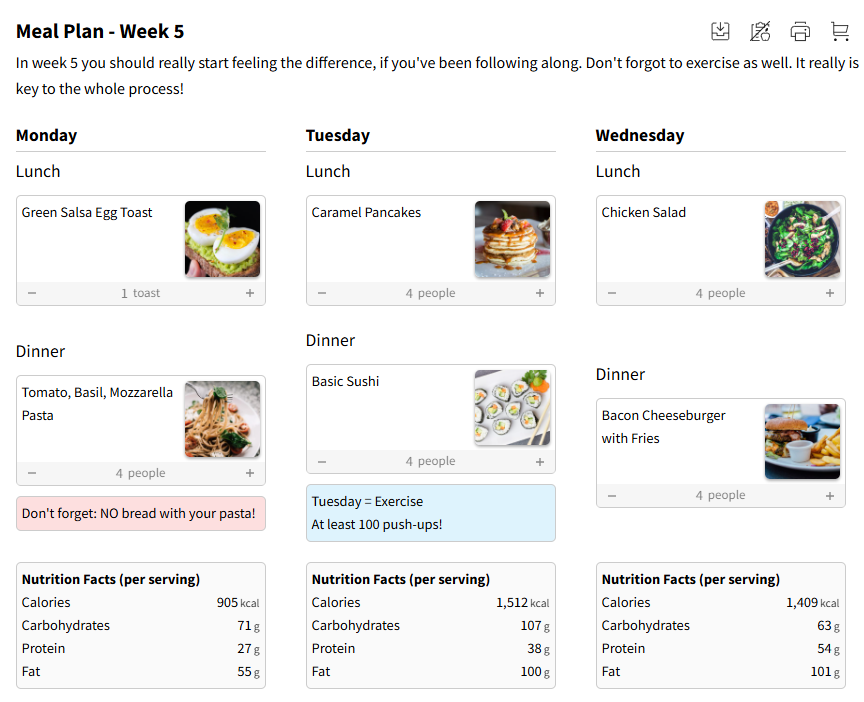
WP Recipe Maker covers the Pinterest essentials: a Pin Recipe button, Pinterest Rich Pins metadata, custom pin images per recipe, and the option to send pins to an existing Repin ID. Tasty Pins, sold separately by WP Tasty, adds hidden Pinterest images and pin descriptions kept separate from your alt text. If Pinterest drives most of your traffic, pair WPRM with a dedicated social plugin such as Grow by Mediavine, which WPRM supports directly.
Template Editor and future-proof customization
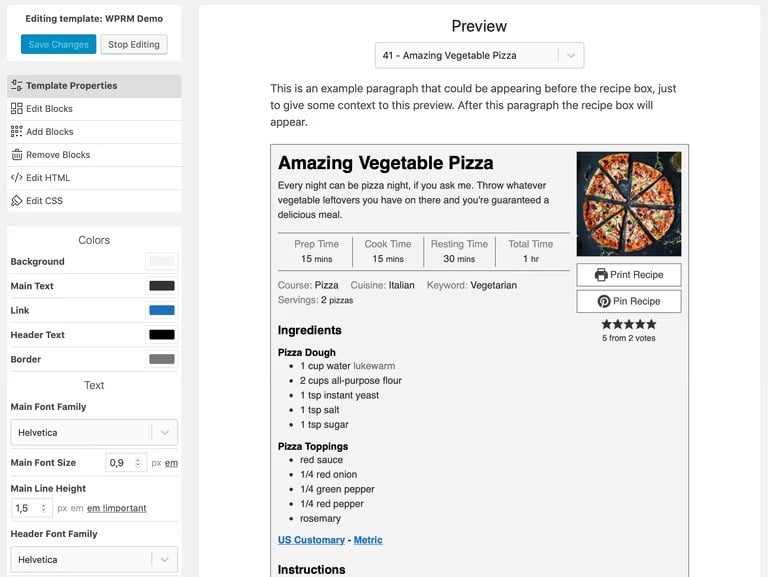
WP Recipe Maker offers the Template Editor, which opens from your WordPress menu and works on three card types: full recipe cards, snippets (the jump-to-recipe box near the top of a post), and roundup items.
You can’t edit the built-in templates, which is deliberate, as the originals stay intact so you can always reset. Instead, you clone the one closest to your vision and work from there. From that clone you can:
- Change background colors, borders, fonts, sizes, and text colors from Template Properties.
- Add, remove, or reorder individual blocks like the rating row, video, or equipment list.
- Edit the raw HTML to hardcode custom text or markup.
- Edit the CSS directly, with your property settings available as variables.
Everything updates in a live preview beside you, using a real recipe from your site.
Tasty Recipes supports custom PHP templates as well, with one caveat worth knowing before you commit. WP Tasty’s documentation states plainly that custom templates aren’t maintained by their team. Any new card feature they release has to be added to your file by you or your developer, and they recommend CSS changes first because template edits can break a site.
Ingredient and equipment affiliate links
Recipe cards are prime real estate for affiliate revenue, because readers are already deciding what to buy.
WPRM Premium handles this natively. Ingredient links are managed in one central place, so you attach a link to “coconut aminos” once, and it applies everywhere that ingredient appears. Equipment links work the same way, with support for equipment images, custom affiliate HTML, and Amazon product linking.
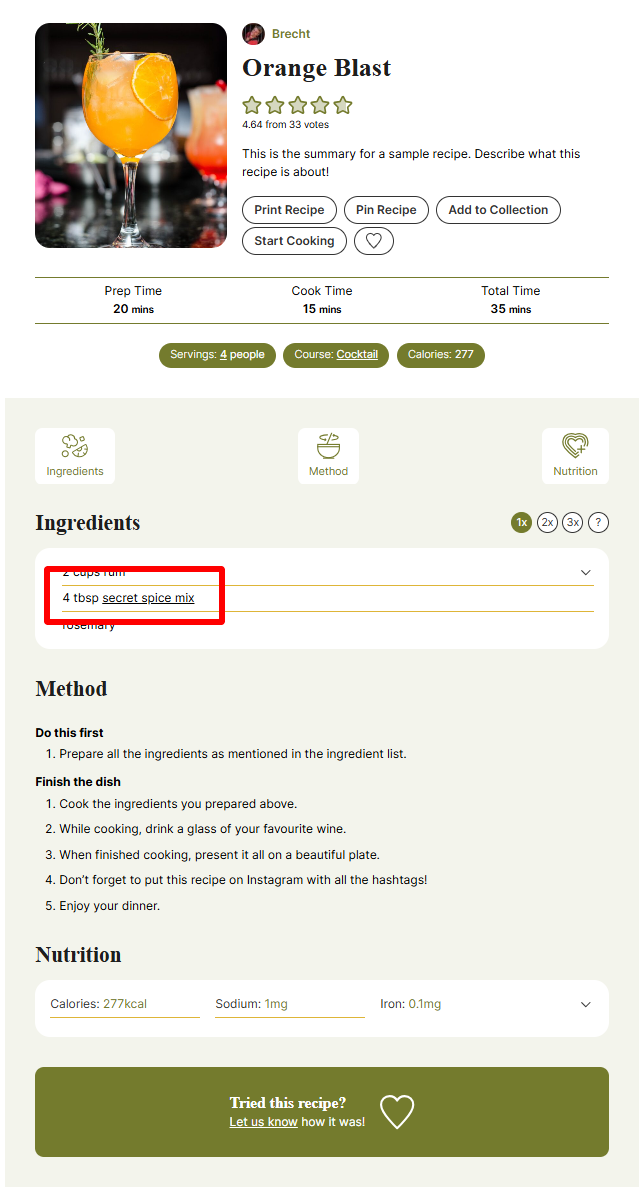
Tasty Recipes displays an equipment section in the card, but converting those mentions into affiliate links is the job of Tasty Links, sold separately at $49 for year one and $99 after. It’s a capable plugin, with automatic keyword linking, disclosure handling, and replacement limits, but it’s an additional purchase.
Automatic nutrition calculation vs manual entry
Displaying nutrition and calculating it are two different jobs, and that’s a real difference here.
Both plugins show nutrition labels. WPRM Pro ($99/year) also does the math, sending your ingredient list to an integrated API and returning values without any outside subscription. Bootstrapped Ventures covers the API credits, and there’s an AI nutrition review to sanity-check results.
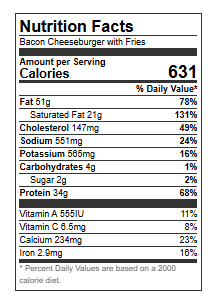
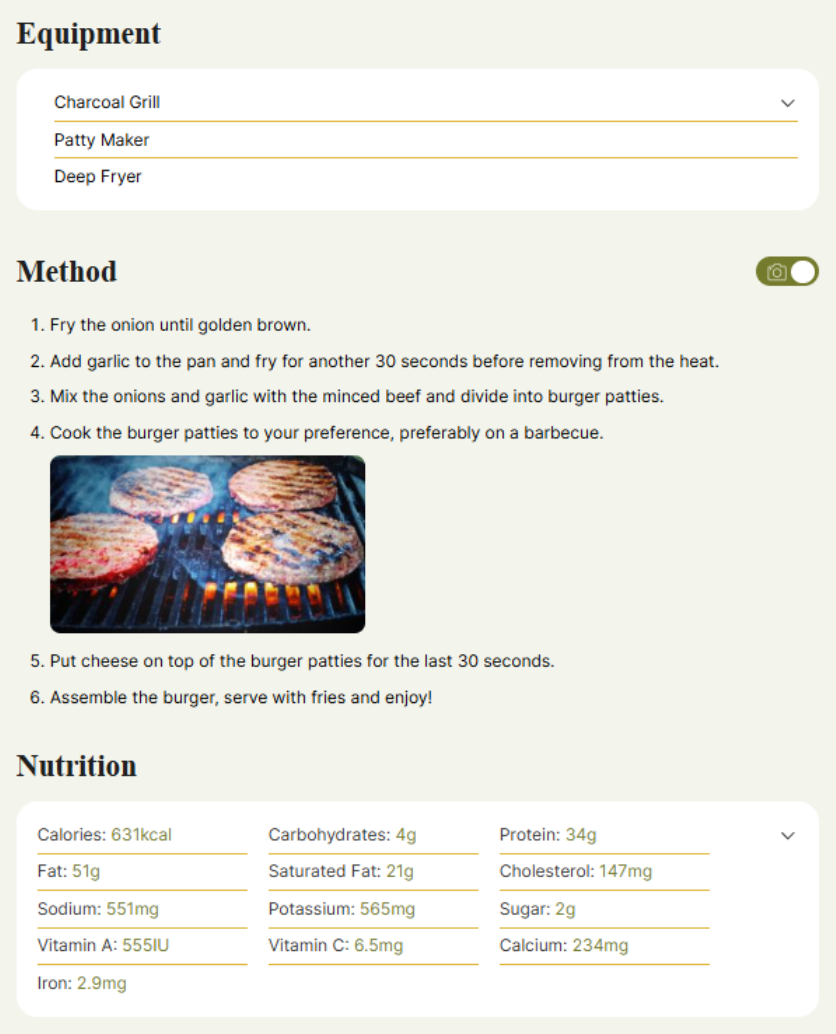
Tasty Recipes fills its nutrition fields either by hand or through Nutrifox, a separate $89/year service from the same parent company.
Manual control remains in both. With WPRM you can overwrite any calculated figure, which matters if a client requires lab-verified numbers or the API misreads an unusual ingredient.
SEO, schema markup, and switching plugins
Let’s settle the SEO question, because it’s the one people worry about most, and the answer is less dramatic than you’d expect.
Both plugins output valid JSON-LD structured data, which is the format Google documents for recipe rich results. That markup is what tells Google your page contains a recipe with a photo, a rating, a cook time, and a calorie count, so the listing can show up as a visual card instead of a plain blue link.
However, remember that structured data makes a page eligible for those richer listings. It isn’t a ranking signal. Adding schema won’t move you from position nine to position two on its own. What it can do is make your result more noticeable once you’re already showing up, which tends to help click-through.
Where the two plugins differ is coverage. WP Recipe Maker generates several types of markup from the same recipe data:
- Recipe schema for standard recipe posts.
- How-to instructions markup for step-by-step, non-recipe tutorials.
- ItemList metadata for roundup posts and for taxonomy archive pages.
- Guided recipe metadata, which is what smart displays and voice assistants read.
- Pinterest Rich Pins data alongside the Google markup.
Two built-in tools back that up: a Recipe Metadata Checker that flags missing fields before Google does, and a Health Check page for site-wide issues.
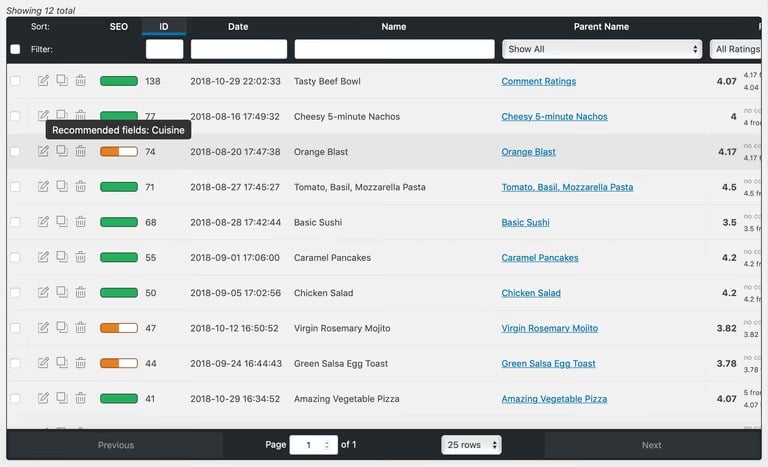
Tasty Recipes produces solid Recipe schema across every plan, free version included. Roundup markup is available in a different plugin, though, which we’ll get to next.
ItemList schema for roundup posts
Roundup posts, like “20 Weeknight Chicken Dinners,” and “15 Healthy Breakfast Recipes,” carry their own structured data type called ItemList. It tells search engines the page is an ordered list of separate recipes rather than one recipe, and it can make the post eligible for a host carousel showing your individual items.
WP Recipe Maker includes ItemList metadata on every plan, including the free plugin. You build roundup items in the editor, style them through Roundup Templates in the Template Editor, and the markup is generated behind the scenes. Archive pages get the same treatment.
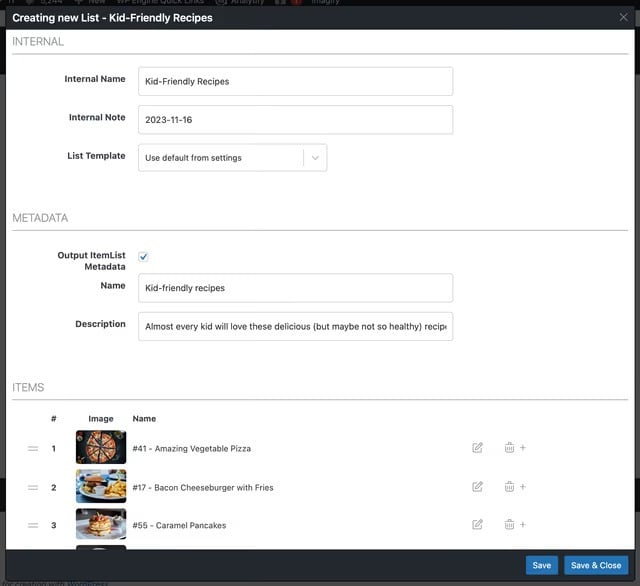
With Tasty Recipes, roundup structured data comes from Tasty Roundups, priced like the rest of the suite at $49 for year one and $99 on renewal.
One important note though, neither plugin can promise you a carousel. Google decides what to display, and eligibility is the ceiling any plugin can offer. The advantage here is practical rather than magical. If roundups are a real part of your content plan, one plugin covers them instead of two.
Migration notes
Switching tools when you have 300 published recipes is the scariest part of this decision, so let’s break it into two separate situations.
Moving up within WP Recipe Maker is not a migration at all. You keep the free plugin active and install the paid bundle next to it, and the paid file adds features to what’s already running. Recipes stay exactly where they are, with nothing to convert, rebuild, or re-import.
Coming from another plugin takes a bit more care. WPRM ships importers for a long list of tools, including Tasty Recipes, Create by Mediavine, WP Ultimate Recipe, EasyRecipe, Cookbook, Cooked, Yummly, ZipList, BigOven, WP Delicious, Recipe Card Blocks by WPZOOM, Simple Recipe Pro, Meal Planner Pro, FoodiePress, and Recipes by Simmer, plus CSV, JSON, plain text, and the Paprika app. Tasty Recipes runs its own converter covering EasyRecipe, EasyRecipe Pro, Mediavine Create, ZipList, Meal Planner Pro, Yumprint Recipe Card, WP Recipe Maker, Cookbook, Yummly Rich Recipes, Simple Recipe Pro, and WordPress.com.
Importers do the heavy lifting, but every plugin stores ingredient and instruction text a little differently, so plan for cleanup either way:
- Back up your database before you run any bulk conversion.
- Spot-check ten posts across different recipe formats, not just your newest one.
- Re-test a few URLs in Google’s Rich Results Test afterward.
- Keep an eye on posts with grouped ingredients or divided quantities, which map least cleanly.
This will take you half a day at the most, but reduces your future risk greatly. Which brings up the next practical question: how much hand-holding do you get while you’re doing all this?
Beginner setup and ongoing support
WP Recipe Maker helps beginners get set up with its WP Recipe Maker 101 knowledge base and welcome videos in the dashboard, so the extra features never turn into extra confusion. Where Tasty Recipes offers unlimited support from the WP Tasty team, WP Recipe Maker questions go straight to the people who build the plugin, including co-founder Brecht Vandersmissen, and get an answer within 24 hours, often much faster.
Plugin fit by reader profile
Everything above was the neutral picture. In this section, we will be a little more opinionated, but only because we want to give you specific advice, rather than a generic one-size-fits-all. Here’s what we’d actually tell four different bloggers who ask us which recipe plugin to choose.
Starting up
You’re in your first year, publishing when life allows, and every subscription feels like one too many. Install WP Recipe Maker free and start writing.
The free plugin isn’t a stripped demo. You get Recipe schema, How-to markup, ItemList metadata for roundups, jump-to-recipe, print, and video support… basically the full search-visibility toolkit at no cost. Later, when affiliate links or adjustable servings start to matter, you add the paid bundle alongside it and nothing you’ve published needs touching.
Tasty Recipes Lite is a fair alternative if you’d rather have three attractive templates and skip settings altogether. Just know that roundup markup and equipment links are behind paid plugins there.
Scaling blogger
Traffic is climbing, you’re chasing ad network numbers, and your cards need to look like they belong to a real brand.
WP Recipe Maker is the better fit for a scaling blogger, even though Tasty Recipes’ ready-made designs get a polished card live sooner, which is why many established bloggers chose it years ago.
The Template Editor keeps pace as your brand evolves, so you’re adjusting a card rather than replacing a plugin. And the math shifts: $49 flat every year, versus $99 at renewal plus whatever add-ons you’ve collected. If you want to see WP Recipe Maker in action, browse the demo portal first. Every template is live there, so you can judge before you install.
Monetizer
Your recipe card is a revenue channel, and you want the fewest moving parts between a reader and a purchase.
WPRM Premium ($49) covers ingredient and equipment affiliate links. Step up to Pro ($99), and calculated nutrition plus unit conversion come with it. ItemList markup for your roundup posts is already there at every tier.
The equivalent Tasty setup means Tasty Recipes, Tasty Links, and a Nutrifox subscription. That’s three renewal dates and $287 by year two. Flat pricing makes forecasting a lot less fiddly when you’re planning a business around it.
Client projects
You’re building for someone else, and the card has to match a brand guide without becoming a maintenance problem.
Use WP Recipe Maker. Clone a template, edit blocks visually, then drop into raw HTML and CSS when the design calls for it, all inside the plugin, with new features still arriving on schedule.
Custom PHP templates in Tasty Recipes work, but WP Tasty states outright that they don’t maintain them. Every feature the team ships has to be hand-merged into your client’s file, which means you’re maintaining forked code indefinitely.
One more practical win with WPRM is that the demo portal gives you real card examples to show clients during scoping, which tends to shorten approval rounds considerably.
Choose your plugin and start publishing
The bottom line is that both of these plugins will serve you well. WP Recipe Maker is the recipe plugin you don’t outgrow: you move from Premium to Pro to Elite without changing plugins, and the price stays the same every year.
Start on the free plugin while you find your footing. Add Premium when affiliate links start earning. Move to Pro when nutrition labels and unit conversion matter to your readers. Reach for Elite when you want saved collections and shopping lists keeping people on your site. Same plugin, same recipes, same price on the sticker every single year.
It also drops into whatever you’ve already built and is compatible with the Block editor, Classic editor, Elementor, and other page builders. No theme swap, no platform migration, no rebuilding what already works.
Bloggers who have chosen WP Recipe Maker have receipts. Jonas at FitTasteTic credits WPRM with roughly 500% traffic growth and the confidence to leave his full-time job. Julie at ThermoKitchen, nine years and several plugins into her career, says nothing else comes close. Sue at My Korean Kitchen runs on it too.
None of them started on the top plan. They started where you’re starting, then moved up when their blog needed it. So pick the stage you’re at right now, and choose the tier that matches your blog today.
Ready to start? Explore the bundles here.